

Qwen-VL is a large multimodal model (LMM) developed by Alibaba Cloud that can process both images and text in a unified framework. It extends the base Qwen language model (LLM) by adding a visual encoder (often called a “visual receptor”) and a specialized input-output interface for images. In essence, Qwen-VL takes the powerful text reasoning of Qwen-LM and endows it with vision capabilities through carefully designed architectural components and training routines. This design allows the model to perceive visual content and integrate it with textual context seamlessly.
At a high level, an image fed into Qwen-VL is converted into a series of visual tokens by the image encoder, which are then processed alongside text tokens by the language model. Qwen-VL’s training included a three-stage pipeline with a large multilingual, multimodal corpus. During training, the model was exposed to images paired with captions, questions, bounding boxes, and text in various languages, so it learned not just to caption images but also to localize objects and read embedded text. Notably, by aligning image–caption–box tuples in training, Qwen-VL acquired visual grounding (object localization) and OCR text-reading abilities beyond conventional image captioning and Q&A.
Qwen-VL was first open-sourced in September 2023, and since then it has evolved into a series of models with increasing capability. Newer versions (such as Qwen-VL-Plus, Qwen-VL-Max, and the Qwen2/VL and Qwen3/VL series) introduced significant upgrades: for example, improved image reasoning, finer detail recognition, and support for ultra-high-resolution images (above 1 million pixels) with arbitrary aspect ratios. These enhancements mean that Qwen-VL can handle large, high-definition images without needing to downscale them to a fixed size, thanks to a dynamic resolution mechanism that maps images to a variable number of tokens. In practical terms, developers can feed very detailed images to Qwen-VL and it will adapt its encoding to the image’s size (within set limits) rather than forcing a small resolution.
The model supports multilingual understanding and generation. Qwen-VL naturally works in English and Chinese (reflecting its training focus), but it also recognizes text within images in many other languages, including major European languages, Japanese, Korean, Arabic, and more. This makes it suitable for globally deployed applications or any scenario where image text might not be in English.
Qwen-VL’s outputs are typically textual descriptions or answers, but importantly, the model can also produce structured outputs like bounding box coordinates when prompted. In other words, Qwen-VL can identify where something is in an image, not just what it is, by returning coordinate data along with text. This combination of vision and language in one system allows Qwen-VL to tackle a broad spectrum of tasks in image understanding and multimodal reasoning.
In summary, Qwen-VL’s architecture fuses a Vision Transformer-based image encoder with a transformer language model, enabling it to “see” and “talk”. It has been trained on diverse vision-language tasks, giving it a versatile skillset. Next, we’ll explore the key capabilities and tasks that Qwen-VL supports, which developers can leverage in their applications.
Key Capabilities and Supported Tasks
Qwen-VL is a general-purpose vision-language model that can be applied to many tasks involving images and text. Below are its primary capabilities and the tasks it excels at:
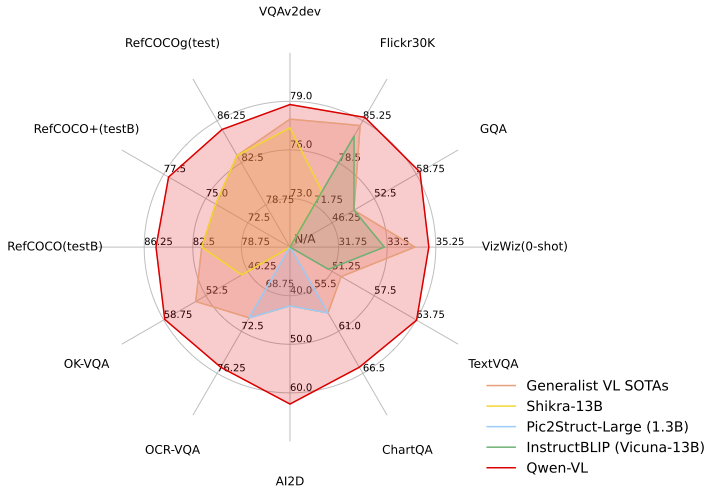
Image Captioning and Description: Qwen-VL can generate detailed natural-language descriptions of images. Given an image, it will identify the main objects, attributes, and activities and produce a coherent caption. It achieves state-of-the-art performance on zero-shot image captioning benchmarks, outperforming many previous generalist models. For example, if provided a photo of a beach scene with people and dogs, Qwen-VL might output a rich description of the scene (e.g. “A woman in a plaid shirt sits on the sand shaking hands with a dog, with ocean waves and a sunset sky in the background.”). This capability is useful for applications like automatic image alt-text generation, media cataloging, or aiding visually impaired users with scene descriptions.
Visual Question Answering (VQA): The model can answer questions about an image, combining its visual perception with language understanding. You can ask open-ended questions (e.g. “What is the person in the image doing?” or “How many people are present?”) or more specific queries about details in the picture. Qwen-VL uses advanced reasoning to handle complex visual questions and has demonstrated strong results on challenging VQA benchmarks. It not only identifies objects but can reason about them – for instance, explaining cause and effect in an image or inferring context. On datasets like natural image QA and diagram understanding, Qwen-VL sets new records for models of similar scale. This makes it suitable for building AI assistants that can answer users’ questions about uploaded images (e.g. “Who is in this photo?” or “What might happen next in this scene?”).
Optical Character Recognition (OCR) and Text Reading: Qwen-VL is capable of reading text that appears within images. Thanks to training on image-text pairs that include text in images, it can perform OCR in a variety of languages. For example, if you show Qwen-VL a photograph of a street sign or a scanned document, it can extract the text content and even answer questions about it. The model’s OCR is robust across 30+ languages and challenging conditions like low lighting, blur, or tilted text. This means developers can use Qwen-VL for tasks such as reading receipts, screenshots, forms, or subtitles in images without needing a separate OCR engine. Additionally, Qwen-VL goes beyond plain text extraction – it can interpret the text in context. For instance, in a screenshot of an invoice, it could both transcribe the text and answer, “What is the total amount due on this invoice?”
Object Recognition and Localization: Qwen-VL can recognize a wide range of objects, people, and landmarks in images. Its visual recognition is very broad due to extensive pretraining: it can identify common objects (animals, vehicles, household items), specific famous individuals (celebrities), characters from cartoons or anime, logos and products, landmarks, plants and animals, etc. – in short, it has been trained to “recognize everything” to the extent an open model can.
Moreover, Qwen-VL can localize what it recognizes. When asked, it can provide bounding box coordinates around objects or regions of interest in the image. For example, you could prompt: “Find the dogs in this image and give their locations.” Qwen-VL might respond with a description and a set of coordinates for each dog detected. This localization ability (sometimes called visual grounding) enables object detection use cases. Developers can leverage it to build vision systems that require identifying where objects are (for instance, highlighting detected items in an image, or guiding a robot to a target object). It effectively combines the functionality of an image detector with a conversational AI that can explain its findings.
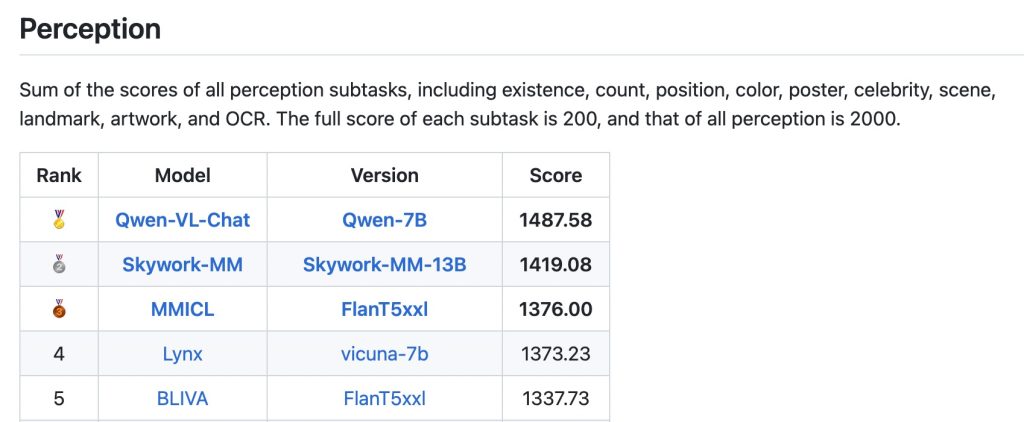
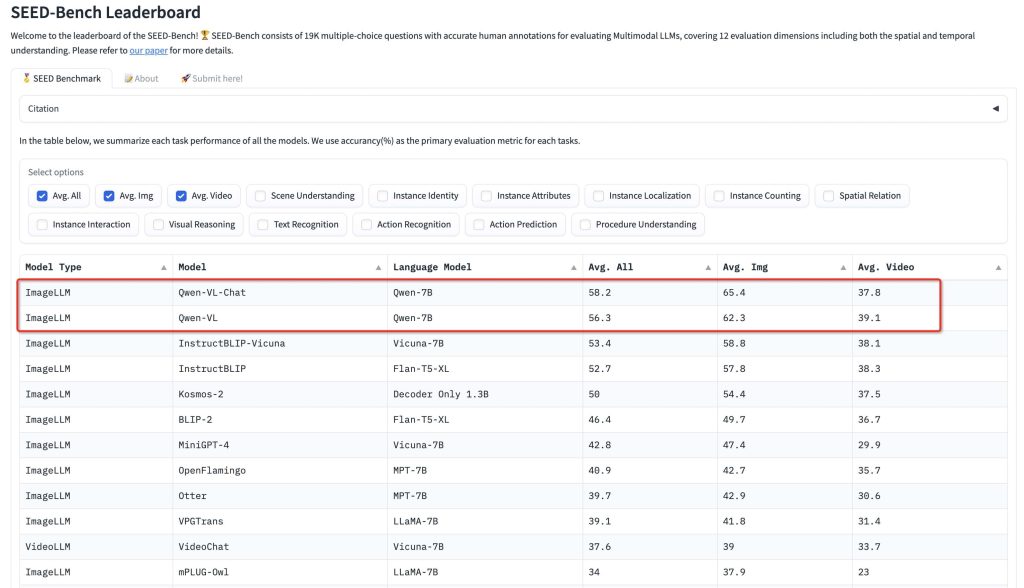
Document and Table Understanding: Beyond photos of natural scenes, Qwen-VL is effective on more structured or abstract visual content like documents, forms, tables, charts, and diagrams. It has demonstrated strong performance on specialized benchmarks such as DocVQA (document visual QA), ChartQA (answering questions about charts/plots), AI2D (science diagrams reasoning), and others. This means Qwen-VL can parse the content of a document image – for example, understanding a table in a screenshot and answering queries about it (“What is the value in the second row, third column?”), or analyzing a bar chart image to explain the data. By combining OCR with visual reasoning, it can interpret layouts and informational graphics. This capability is valuable for building systems that need to extract knowledge from scanned documents or images of slides, or to enable natural-language questions over PDFs and forms (by converting them to images and using Qwen-VL as the brain). Essentially, tasks that previously required separate OCR + heuristic parsing can be approached with Qwen-VL in a single step.
Multimodal Reasoning and Advanced Visual Understanding: One of Qwen-VL’s strengths is reasoning about visual information in a step-by-step, contextual way. It doesn’t just detect elements in an image – it can draw inferences, make logical connections, and incorporate external knowledge when answering. For instance, Qwen-VL excels at tasks like solving visual math problems (interpreting a diagram or chart and performing calculations) and understanding spatial or causal relationships in images. It has been tuned to provide evidence-based answers for visual queries, rather than guess. In practical terms, this means you can have a dialogue with Qwen-VL about an image: you might ask what’s in the image, then follow up with deeper questions (e.g. “Why might this person be doing X?” or “How do you think this scene relates to Y?”), and the model will incorporate both the image and the prior conversation context into its reasoning.
Thanks to a large context window and training on conversational data, Qwen-VL can carry on multi-turn discussions about an image, maintaining context across questions. It can even produce creative responses inspired by images – for example, writing a short story or poem about a given picture – demonstrating a high-level cognitive understanding of visual input. This advanced multimodal reasoning makes Qwen-VL suitable for complex applications like AI tutors (explaining diagrams in a lesson), virtual assistants that plan actions based on an image, or analytical tools that generate reports from visual data.
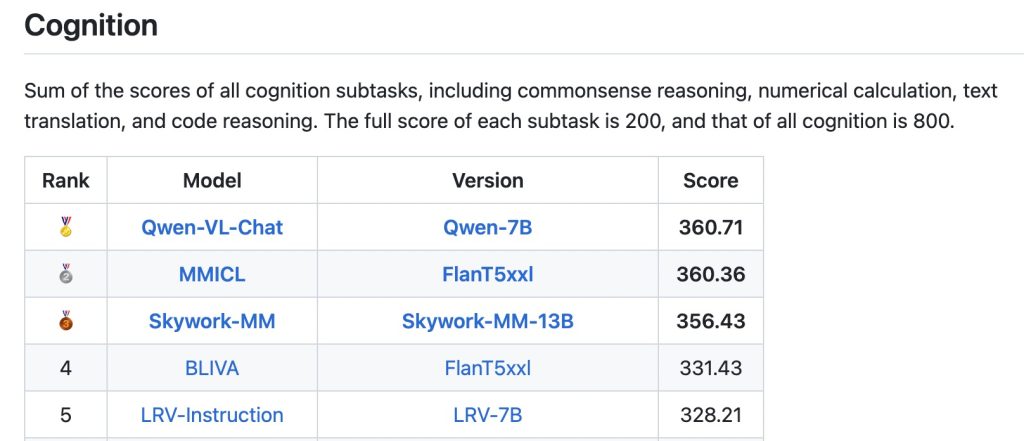
In summary, Qwen-VL is a versatile vision-language model that covers tasks from straightforward (describing or labeling an image) to highly advanced (reasoning, multi-step analysis, reading dense documents). Developers can tap into these capabilities by providing appropriate prompts and images, as we will discuss next. Importantly, Qwen-VL’s multi-talented nature means a single model can replace what previously required multiple separate systems (OCR engine, object detector, caption generator, etc.), simplifying the pipeline for multimodal applications.
Input Formats and Context Handling
Input Modalities: Qwen-VL accepts input in the form of images combined with text prompts. Images can be provided in various formats and sources – for example, as local image files, by URL, or even as base64-encoded image data. The model isn’t picky about image file types: common formats like JPEG or PNG are all acceptable, as long as they are supplied through the interface that the model’s processor expects. Under the hood, the image will be processed (e.g. loaded and resized) by Qwen-VL’s preprocessing tools. Developers do not need to manually convert images to anything like embeddings – the model’s AutoProcessor or API will handle that.
Multiple Images: Qwen-VL supports multiple images in a single request or conversation turn. You can include, say, two or three images along with a prompt asking the model to compare them or reference each one. This is useful for tasks such as product comparison (e.g. “Compare these two product images and tell me the differences”) or multi-page document understanding (sending each page as an image in one query). When multiple images are provided, Qwen-VL will typically refer to them as separate entities (often numbering them “Image 1”, “Image 2”, etc. in its answer for clarity).
There is effectively no hard-coded limit on the number of images; instead, the limit comes from the model’s overall context length and token budget. Each image is translated into a certain number of visual tokens, which, combined with the text tokens of your prompt, must stay under the model’s maximum sequence length. In practice, this means you could input many small images, or a few large images, as long as the total tokens (image tokens + text tokens) don’t exceed the model’s limit. The Qwen-VL documentation notes that this is the guiding factor for multi-image input.
Context Length: Qwen-VL models offer a very large context window for inputs, especially in the latest generations. The initial Qwen-VL versions had context lengths similar to typical LLMs (e.g. thousands of tokens), but Qwen3-VL expanded this dramatically. Qwen3-VL has a native 256,000 token context window for combined vision-language inputs, and even provides mechanisms to extend up to ~1 million tokens. This extremely long context is a standout feature – for perspective, 256k tokens might correspond to around 150–200 pages of text.
In multimodal terms, it means Qwen-VL can handle very lengthy sessions or very detailed inputs, such as an entire book with images, or a long video broken into frames. For most image applications you won’t hit that limit, but it opens the door to processing hours-long videos or multi-chapter documents with full retention of context. Of course, using the maximum context incurs heavy computational cost, so it’s an option for specialized cases rather than a default. Still, developers can rely on at least several thousand tokens of context in more typical deployments, which is plenty for a detailed image description plus follow-up questions and answers in a conversation.
Image as Tokens: It’s worth noting how images count toward the context. Qwen-VL’s image encoder breaks an image into a grid of patches (like many vision models do) and then embeds those into tokens. Thanks to the naive dynamic resolution mechanism, the number of image tokens is proportional to the image size. For example, a small thumbnail image might produce only a few hundred visual tokens, whereas a large high-resolution photograph could produce thousands of tokens. The model’s default configuration allows up to about 16k visual tokens per image (which corresponds to millions of pixels). The upshot for developers is that if you feed a very high-res image, it will consume more of the context budget (and memory).
You have the ability to control this: the Qwen-VL processor lets you set min_pixels and max_pixels to constrain how an image is scaled, effectively capping the token usage for an image. For instance, you might restrict images to, say, 1024 tokens each to balance quality and speed. If an image exceeds the max pixel setting, it will be resized down until it fits the token budget automatically. This is a useful tuning knob when deploying Qwen-VL in production – it means you can handle arbitrary image sizes but still enforce performance limits.
Special Prompt Format: When using Qwen-VL, especially via the raw model or API, it expects a specific input format that interleaves images and text. Internally, the model recognizes markers like <|vision_start|>...<|vision_end|> around image content. If you use the provided SDK or Transformers integration, you don’t have to manually add these markers – the AutoProcessor will do it for you. Essentially, you provide a structured input where images are indicated by placeholders, and the processor generates the combined sequence that the model needs. For example, a single-user prompt with one image is represented (behind the scenes) as:
<|im_start|>user
<|vision_start|><|image_embed|><|vision_end|>Your question about the image?<|im_end|>
<|im_start|>assistant
The model then generates the <|im_start|>assistant response tokens. This is analogous to how ChatGPT or other chat models format conversation, but including images. Again, as a developer you typically won’t construct this string by hand – you will call a library function or API endpoint with the image and text separately and it will handle formatting.
In summary, Qwen-VL is flexible in how you feed it images (one or many, various sources) and provides a huge context window to work with. The main considerations are managing the token budget for large images and using the proper input format. Next, we’ll see how to use Qwen-VL in practice with some code examples.
Using Qwen-VL: API and Examples
Developers can interact with Qwen-VL either by running the model locally (e.g. via Hugging Face Transformers or ModelScope) or by calling a cloud API. Qwen-VL is open-source, so you can download the model weights (for example, the 7B parameter Qwen2-VL or larger variants) and run it on your own hardware if you have a suitable GPU. Alternatively, Alibaba Cloud provides a hosted API (as part of Model Studio) where you can send HTTP requests to get Qwen-VL’s output without managing the infrastructure. Below are examples for both approaches:
Python Example (Local Usage with Transformers)
Using Qwen-VL locally requires the transformers library (with Qwen integrated) and the Qwen-VL model files. You can install the Qwen-VL support utilities with pip install qwen-vl-utils which helps handle visual inputs. In this example, we’ll load an instruction-tuned Qwen-VL model and have it describe an image:
import torch
from transformers import AutoProcessor, AutoModelForImageTextToText

# Load the Qwen-VL model and its processor (here we use the 7B instruct variant)
model_name = "Qwen/Qwen2-VL-7B-Instruct"
model = AutoModelForImageTextToText.from_pretrained(model_name, device_map="auto")
processor = AutoProcessor.from_pretrained(model_name)

# Prepare an image and a prompt
from PIL import Image
image = Image.open("example.jpg")  # Load your image from file
user_prompt = "Describe the image in detail."

# Format the inputs for Qwen-VL
# The processor will handle adding the special tokens and image encoding
inputs = processor(text=user_prompt, images=image, return_tensors="pt").to(model.device)

# Run the model to generate an answer
with torch.no_grad():
    output_ids = model.generate(**inputs, max_new_tokens=100)
# Decode the generated ids back to text
answer = processor.decode(output_ids[0], skip_special_tokens=True)
print("Model answer:", answer)
In this code, the AutoProcessor takes care of converting the image + text into the model’s expected input format. We simply provide a PIL image and a prompt string. The model then generates a textual description. For example, if example.jpg was a photo of a woman on a beach with a dog, the printed answer might be:
Model answer: This is a photo taken on a beach. It shows a woman sitting on the sand and smiling at a dog. The dog is wearing a collar and appears to be raising its paw as if shaking hands with the woman. In the background are the sea and sky under bright sunlight.
This matches the kind of output we expect (and indeed corresponds to the earlier description example). The above code uses an instruction-tuned Qwen-VL model, which means it’s optimized to follow user instructions and produce helpful, conversational answers. If you instead load a base Qwen-VL (non-instruct) or Qwen-VL-Chat model, you might include a system prompt and roles, but the processor can manage that as well by using a message dictionary (as seen in official examples).
For more complex interactions, you can build a conversation. For instance, you could feed an image with user_prompt = "What is in this image?", get an answer, then prepare a new input where the conversation history plus a new question (without re-sending the image unless needed) is given. The Qwen-VL model will maintain context across turns if you prepend the previous Q&A appropriately. The transformers apply_chat_template utility can format multi-turn dialogues with images for you.
Performance considerations: Running a 7B model with images will generally require a GPU (a modern 16 GB GPU can handle 7B with medium resolution images). Larger Qwen-VL models (e.g. 30B or 72B) will need more powerful multi-GPU setups. You can also enable optimizations like FlashAttention for better speed. If you don’t have the resources locally, consider using the cloud API.
HTTP API Example (Alibaba Cloud Model Studio)
Qwen-VL is offered as a service through Alibaba Cloud’s API, which is convenient for integration into web applications. The API is JSON-based and supports a format similar to OpenAI’s Chat Completion API, but with extensions for images. You would need to obtain an API key and endpoint URL from Alibaba Cloud Model Studio to use it. Below is an example curl command that sends an image URL and a question to the Qwen-VL API (using the Singapore region endpoint and the Qwen3-VL-Plus model as an example):
curl -X POST "https://dashscope-intl.aliyuncs.com/api/v1/services/aigc/multimodal-generation/generation" \
  -H "Authorization: Bearer $DASHSCOPE_API_KEY" \
  -H "Content-Type: application/json" \
  -d '{
    "model": "qwen3-vl-plus",
    "input": {
      "messages": [
        {
          "role": "user",
          "content": [
            {"image": "https://example.com/path/to/image.jpg"},
            {"text": "What is depicted in the image?"}
          ]
        }
      ]
    }
  }'
In this JSON payload, we specify the model name (qwen3-vl-plus in this case; you can choose other available model variants) and provide a messages list with a single user message. The content of the message is an array where we include an "image" entry with a URL (it could also be a base64 string if you upload an image file) and a "text" entry with our question. The API will fetch the image from the URL and feed it into Qwen-VL along with the question.
The response from this API will be a JSON object containing the assistant’s reply. For example, a successful response might look like:
{
  "output": {
    "choices": [
      {
        "message": {
          "role": "assistant",
          "content": [
            {
              "text": "This is a photo taken on a beach. In the image, a woman is sitting on the sand and smiling at a dog. The dog (a Labrador retriever) is raising its paw as if shaking hands with the woman. The ocean and sky are in the background, and sunlight is illuminating the scene with a warm glow."
            }
          ]
        },
        "finish_reason": "stop"
      }
    ]
  },
  "usage": {
    "input_tokens": 1271,
    "image_tokens": 1247,
    "output_tokens": 55
  },
  "request_id": "abcdefg-12345..."
}
The assistant’s answer is found under message.content[0].text. In this case it returned a descriptive paragraph about the image. The usage field indicates how many tokens were used – notice the image counted for 1247 tokens in this example.
The Alibaba Cloud API also supports sending multiple images in the content array. To do so, you would include multiple {"image": ...} entries followed by perhaps a {"text": ...} prompt that asks about all the images. The service even provides an OpenAI-compatible endpoint where you use "content": [{"type": "image_url", "image_url": {"url": "..."}}, {"type": "text", "text": "..."}] format, but the core idea is the same. Using the API, you can integrate Qwen-VL into any app by making HTTPS requests – for example, a web frontend can send user-uploaded images to this API and display the returned answer.
Note: When using the API, ensure you follow the documentation on obtaining an API key and consider the regional endpoints (Singapore vs Beijing) as the URL may differ. Also be mindful of the request size (image size affects token count as shown). The API will reject or truncate input that is too large for the model.
Between the Python local usage and the HTTP API, developers have flexibility depending on their needs (on-premises vs cloud). For quick experiments, you can also try Qwen-VL on Hugging Face Spaces or other demo sites, but for production, the above methods are recommended.
Integration into Applications and Workflows
Thanks to its broad skill set, Qwen-VL can be integrated into various developer workflows. Here we discuss a few patterns for using Qwen-VL in real applications:
Interactive Chatbots with Vision: One straightforward application is enhancing a chatbot or virtual assistant with the ability to see images. Using Qwen-VL as the backend, you can allow users to upload or paste an image in a chat, and then ask questions or get a description of that image. For instance, a support chatbot could let a user show a picture of a product and ask, “How do I use this device?” – Qwen-VL could identify the product and perhaps read its labels or buttons to help answer.
Implementing this involves capturing the image in the chat interface, sending it to Qwen-VL along with the user’s query, and then displaying the model’s textual response. Because Qwen-VL is conversational, it can handle follow-up questions about the same image without needing the image re-sent (as long as you maintain the conversation context). This opens up more natural, multi-turn interactions in vision-enabled assistants.
Multimodal Agents and Tool Integration: Qwen-VL can serve as the “eyes” of an autonomous agent in more complex systems. For example, in a robotics context, Qwen-VL could analyze camera images from a robot and provide interpretations that guide the robot’s decisions. The Qwen team specifically mentions the model’s ability to be integrated with devices like mobile phones or robots for automatic operation based on visual input. In practical terms, you might have an agent that uses Qwen-VL to parse a live image (e.g. recognizing a user’s surroundings or the content on a screen) and then, based on the model’s description or detection, the agent decides on an action (like pressing a button, or moving towards an object).
Qwen-VL’s understanding can also be combined with tool use: for instance, if the model reads a URL or a reference in an image, the agent could use that information to call another API. An exciting example of integration is using Qwen-VL for UI automation – the Visual Agent capability in Qwen3 allows the model to recognize elements in a GUI screenshot and even generate actions or code (like HTML/CSS) from it. A developer could leverage this by feeding Qwen-VL an application screenshot and a command like “book a flight for me on this website,” and the model could identify relevant buttons/fields and theoretically generate a sequence of actions. While such uses are cutting-edge, they illustrate how Qwen-VL can be part of an agent loop that observes (via images) and acts (via generated instructions or code).
Pipelines for Data Analysis: Qwen-VL can be inserted into data processing pipelines wherever image understanding is required. For example, consider a document processing pipeline: normally, one might use OCR to extract text, then a parser to get information. With Qwen-VL, you can instead feed the document image and directly ask for the needed info: “Extract the customer name and total amount from this invoice.” The model will output those details, combining its OCR and reasoning in one step. This simplifies pipelines. Similarly for multimedia content: you could extract video frames and send them to Qwen-VL with questions to create a summary of a video, or to index its content.
In computer vision pipelines, Qwen-VL can be used as a generalist model to generate annotations (a process known as auto-labeling). For instance, with a set of unlabeled images, you might use Qwen-VL to caption each image or list the objects in it, and use those outputs as annotations for a training dataset. Tools like Autodistill have demonstrated using Qwen-VL in this way to help train specialist vision models. The benefit is you get a rich, high-level understanding from Qwen-VL that might combine object detection, classification, and description all in one.
Combining with Other Models: Although Qwen-VL is very capable on its own, developers can also use it alongside other models. For example, you could use a dedicated face recognition model in tandem with Qwen-VL: let Qwen-VL describe a scene, but use a specialist model to verify identities of people if absolute accuracy is needed. Or use Qwen-VL to filter or route tasks – e.g., first ask Qwen-VL “Is there text in this image or just objects?” If it says there’s text, you might then apply a high-accuracy OCR engine; if it’s objects, maybe you use a detection model.
In essence, Qwen-VL can function as an AI director that understands the content and decides subsequent processing. Additionally, Qwen-VL’s text output can feed into text-only LLMs for further analysis or into databases for storage. Its bounding box outputs (when you prompt for them) can be used to crop image regions for further inspection or to draw visualizations on a frontend highlighting what the model mentioned.
Integrating Qwen-VL is facilitated by the fact that it uses standard interfaces (either the Transformers API or a REST API). It can be wrapped into a microservice or function that takes an image and question and returns an answer, making it easy to drop into existing architectures. For example, a web app could have a backend route /describeImage that calls Qwen-VL and returns the result to the client.
Libraries like LangChain are also beginning to support multimodal models, meaning Qwen-VL could be one of the tools in a larger AI orchestration (for instance, an agent that can choose to either call a text-only model or Qwen-VL depending on the query).
In all these workflows, a key advantage of Qwen-VL is maintaining rich context. It doesn’t just output a label or bounding box – it can output an explanation or reasoning. This can greatly enhance user trust and debuggability, as the model can effectively “show its thinking” in the answer (you can even prompt it to explain its answer). Developers should leverage this by asking Qwen-VL to provide rationales if appropriate, especially for complex analyses.
Limitations and Best Practices
While Qwen-VL is powerful, developers should be aware of its limitations and follow best practices to get the most out of it:
Known Limitations: (as identified by the model’s developers)
- No Audio Understanding: Qwen-VL cannot process audio – if you provide a video, it will handle the frames visually but not any soundtrack. It’s purely vision (and text) based.
- Knowledge Cutoff: The model’s training data for images goes up to about June 2023. It may not recognize very recent events, new products, or newly famous individuals beyond that point. Always consider the knowledge cutoff – for example, it might not identify a brand-new car model released in 2024.
- Individual/IP Recognition: Qwen-VL’s ability to recognize specific people, logos, or intellectual property is not guaranteed to be comprehensive. It might miss some well-known personalities or trademarked images if they weren’t in the training data. (Also, depending on licensing, the model might intentionally avoid some recognitions.)
- Complex Instructions: The model can struggle with executing very complex multi-step instructions or intricate tasks perfectly. If you ask it to perform a long chain of reasoning or a very detailed set of instructions on an image, it might get parts wrong or lose track. Breaking tasks down or guiding it step by step can help.
- Counting and Precision: Qwen-VL is not very reliable at counting objects in complicated scenes. It might miscount if there are many similar items or they’re small. If an exact count is needed, you may want to double-check its answers.
- Spatial Reasoning: The model has weak spatial reasoning in 3D contexts. While it can describe relative positions in a 2D image (like “on the left” or “behind”), it may not accurately infer true 3D relationships (which object is closer, etc.) or complex spatial arrangements. Use caution if your application relies on precise spatial understanding (e.g. inferring measurements or geometry from an image).
These limitations highlight areas where Qwen-VL might make mistakes. In critical applications, you should include checks or fallback methods. For instance, if the model’s answer involves counting (say, “there are 7 people in the image”), you might use an object detection model to verify that count, or at least be aware it could be off.
Prompting Best Practices: To get the best results, carefully craft your prompts. Qwen-VL generally does well with straightforward instructions, but you can often improve clarity by specifying the format or focus of the answer. For example, instead of just “What do you see?”, you might ask “Describe the image in detail, focusing on the people and their actions.” If you want a list of items, you can prompt “List all the objects you can identify in this image.” The model will follow these cues. If you need structured output (like JSON or XML), you can attempt to prompt the model to format its answer as such – Qwen-VL, being instruction-tuned, will try to follow formatting instructions (though always verify the output).
When dealing with multi-turn dialogues, use the system role (or initial prompt) to set the context. A brief instruction like “You are a vision assistant that answers questions about images.” can help align the responses. Qwen-VL is designed to be helpful and harmless, so it may refuse or produce safe completions if asked about sensitive content in images (similar to other AI assistants). Ensure your use case complies with its usage guidelines (for example, it might not output certain types of personal data from an image).
Performance and Scaling: Running large models like Qwen-VL in production requires optimization. If you need faster responses or have limited GPU memory, consider using the smaller Qwen-VL variants (e.g. a 2B or 4B model if available) or applying model quantization. The Qwen team has released quantized versions (INT8/INT4) for some model sizes, which can significantly reduce memory usage at some cost to accuracy. Also, leverage batching if you have high throughput – Qwen-VL’s processor and model support batching multiple image queries together to amortize overhead.
Another best practice is to adjust image resolution based on your needs. If ultra-fine detail is not necessary, you can cap the image size to reduce tokens (as described earlier, via min_pixels/max_pixels). For example, a 512×512 image might be sufficient to recognize most content, and downsizing huge images can cut latency drastically. The processor can do this resizing for you. Conversely, if you need the model to pick up small text or details, feeding a higher resolution can improve accuracy – just be aware of the computational cost.
Verification: In applications where correctness is important, use Qwen-VL’s ability to explain itself. You can ask it to justify an answer: “How do you know that?” Often, it will cite visible evidence from the image (e.g. “I see a label on the bottle that says ‘Pepsi’, that’s why I identified the drink”). This can help you verify that the model isn’t hallucinating.
If the explanation doesn’t match the image, that’s a red flag. Additionally, when extracting specific information (like numbers or names from an image), double-check the output or cross-verify with a dedicated OCR if possible, since AI models can occasionally misread characters.
Licensing and Usage: Qwen-VL is open-source under the Tongyi Qianwen license (for earlier versions) or Apache 2.0 for some releases. This generally means it’s free to use, but do check the exact terms, especially if you plan commercial use, as some versions had restrictions on model usage (the Tongyi Qianwen license has clauses about not violating laws, etc.).
Alibaba also provides it free for experimentation on their chat website, but our focus here is integration into your projects.
In conclusion, Qwen-VL is a cutting-edge multimodal model that brings powerful image understanding to developers’ toolkits.
By knowing its capabilities — from captioning and answering questions to reading text and detecting objects — and using the provided APIs or libraries, you can build a wide range of applications that see and reason. Keep in mind the limitations, follow best practices for prompting and performance tuning, and Qwen-VL can become a highly effective component in your AI systems, enabling advanced visual intelligence in real-world workflows.
With continuous improvements (the Qwen team actively updates the model with better versions), Qwen-VL stands as a leading example of open, developer-friendly vision-language AI ready to be leveraged for innovation in multimodal applications.